SparkNavi F9P GPS Module Setup
Flight controller guide · For SparkNavi Blue / Blue2. Flight controller overview.
The SparkNavi F9P GPS module combines a u-blox ZED-F9P-04B multi-band RTK receiver with a BMM150 compass on a compact 36.5 × 36.5 mm board. It supports use as GPS1, GPS2, or both simultaneously on the SparkNavi Blue flight controller, and is compatible with Pixhawk / ArduPilot / iNAV firmware.
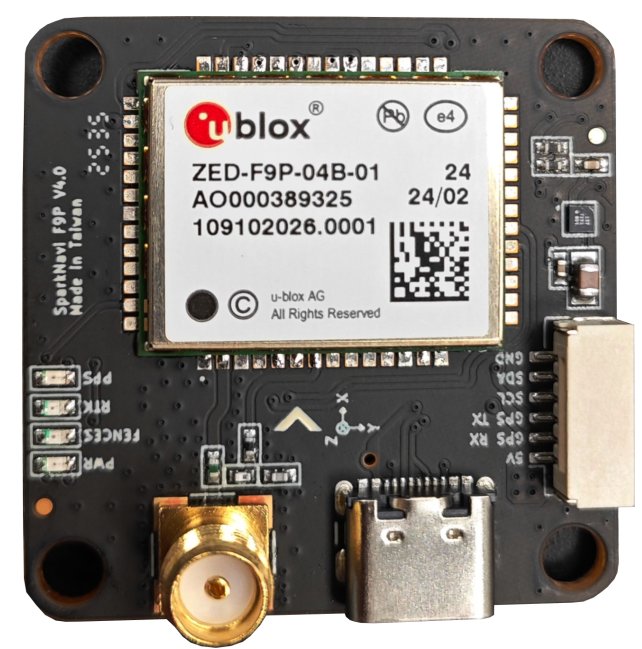
Hardware Specifications
| Category | Value |
|---|---|
| GNSS receiver | u-blox ZED-F9P-04B (multi-band L1 / L2 / E5b) |
| Constellations | GPS (L1C/A L2C), GLONASS (L1OF L2OF), Galileo (E1-B/C E5b), BeiDou (B1I B2I), QZSS (L1C/A L2C) |
| SBAS | WAAS, EGNOS, MSAS, GAGAN, SouthPAN |
| Accuracy (antenna-dependent) | <1 cm with base station up to 35 km · 1 cm with NTRIP up to 35 km · 4 cm with SSR · 1.5 m standalone · 0.9 m SBAS |
| Update rate | 1 Hz default · up to 10 Hz max performance · up to 20 Hz reduced |
| Time to first fix | 25 s cold / 2 s hot · RTK fix 35 s cold |
| Compass | Bosch BMM150 (I²C, 3-axis magnetometer) |
| Functionality | Base & Rover, RAW UBX output |
| Interfaces | UART × 1, USB Type-C × 1 |
| Operating temperature | −40 °C to +85 °C |
| Dimensions | 36.5 × 36.5 mm, screw spacing 30.5 × 30.5 mm, 10.0 g |
| Origin | Designed and manufactured in Taiwan |
Antenna selection determines real-world accuracy
The centimeter-level accuracy figures above assume a multi-band antenna covering L1 / L2 / E5b with stable phase center and good multipath rejection (typically a survey-grade helical or patch antenna). With a single-band patch antenna — even with RTK corrections available — real-world accuracy will fall back toward the standalone / SBAS figures. Antenna choice is the single largest factor in achievable precision for this module.
Hardware Wiring
The SparkNavi F9P module uses a 6-pin connector:
| Pin | Signal | Description |
|---|---|---|
| 1 | +5V | Module power |
| 2 | GPS RX | UART receive (from FC TX) |
| 3 | GPS TX | UART transmit (to FC RX) |
| 4 | SCL | I²C clock (BMM150 compass) |
| 5 | SDA | I²C data (BMM150 compass) |
| 6 | GND | Ground |
Connecting to SparkNavi Blue GPS1
GPS1 on SparkNavi Blue is an 8-pin connector. The first 5 signal pins map 1-to-1 with the F9P module; pins 6–7 (SAFETY_SWITCH / LED) on Blue are not used by this module.
| Blue GPS1 Pin | Signal | SparkNavi F9P Pin |
|---|---|---|
| 1 | +5V | 1 (+5V) |
| 2 | GPS1_TX | 2 (GPS RX) |
| 3 | GPS1_RX | 3 (GPS TX) |
| 4 | I2C2_SCL | 4 (SCL) |
| 5 | I2C2_SDA | 5 (SDA) |
| 6 | SAFETY_SWITCH | — (not connected) |
| 7 | SAFETY_SWITCH_LED | — (not connected) |
| 8 | GND | 6 (GND) |
Connecting to SparkNavi Blue GPS2
GPS2 on SparkNavi Blue is a 6-pin connector — a direct 1-to-1 match with the F9P module.
| Blue GPS2 Pin | Signal | SparkNavi F9P Pin |
|---|---|---|
| 1 | +5V | 1 (+5V) |
| 2 | GPS2_TX | 2 (GPS RX) |
| 3 | GPS2_RX | 3 (GPS TX) |
| 4 | I2C2_SCL | 4 (SCL) |
| 5 | I2C2_SDA | 5 (SDA) |
| 6 | GND | 6 (GND) |
Note
Both GPS1 and GPS2 share the same I²C2 bus on SparkNavi Blue. When two SparkNavi F9P modules are connected simultaneously, both BMM150 compasses are detected on I²C2 with different addresses — ArduPilot automatically assigns them as the primary and secondary external compasses.
ArduPilot Parameters — Single GPS (Primary)
For a single SparkNavi F9P module connected as GPS1, the default ArduPilot serial settings (GPS UART at 230 400 baud) already work. The key parameters to verify:
| Parameter | Value | Description |
|---|---|---|
GPS1_TYPE |
2 (u-Blox) |
u-blox driver (auto-detects F9P) |
GPS_AUTO_CONFIG |
3 |
Clear non-ArduPilot config and apply defaults on boot (recommended for u-blox Gen 9+) |
GPS_AUTO_SWITCH |
1 (Use best) |
Default — switches based on fix quality |
GPS_PRIMARY |
0 (GPS1) |
First instance is primary |
After Write Params and Reboot, Mission Planner Status should show:
- gpsstatus ≥
3(3D fix);4= DGPS,5= RTK Float,6= RTK Fixed - satcount typically 20–30+ with clear sky view (multi-constellation)
ArduPilot Parameters — Dual GPS
When using two SparkNavi F9P modules (GPS1 + GPS2), both are identical multi-band F9P units. The recommended switching strategy is Blend.
| Parameter | Value | Description |
|---|---|---|
GPS1_TYPE |
2 (u-Blox) |
Primary instance |
GPS2_TYPE |
2 (u-Blox) |
Secondary instance |
GPS_AUTO_CONFIG |
3 |
Clean u-blox config on boot |
GPS_AUTO_SWITCH |
2 (Blend) |
Average the two solutions |
GPS_PRIMARY |
0 (GPS1) |
First instance is primary when not blending |
GPS_INJECT_TO |
127 (Broadcast) |
Forward RTCM correction stream to both GPSes — required for RTK with NTRIP |
Why Blend for two identical F9P modules?
GPS_AUTO_SWITCH = 2 (Blend) is designed for two units of the same type and quality. Both F9P modules will normally produce equally-good solutions, and blending suppresses transient errors on either unit. If the two modules are dissimilar (e.g., one F9P + one M8N), use 4 (Use Primary if 3D fix) instead.
GPS Auto Configuration (GPS_AUTO_CONFIG)
GPS_AUTO_CONFIG controls whether ArduPilot rewrites the GPS module's internal configuration on boot:
| Value | Behavior | When to use |
|---|---|---|
0 |
Disable automatic configuration | Only when using a custom GPS configuration written by hand via u-center — not recommended for the SparkNavi F9P |
1 |
Auto-configure serial GPS modules | Default. Works for most use cases |
2 |
Auto-configure DroneCAN GPS modules as well | Required when configuring GPS for Yaw / Moving Baseline over DroneCAN |
3 |
Clear all non-ArduPilot u-blox config and reapply defaults | Recommended for SparkNavi F9P — guarantees a clean known-good config every boot (u-blox Generation 9+) |
Reverting from Moving Baseline mode
If GPS_AUTO_CONFIG = 2 is selected for a Moving Baseline setup and you later want to return to non-moving-baseline operation, connect to the DroneCAN peripheral(s) and manually restore the internal GPSx_TYPE parameters to default. See ArduPilot's Positioning Landing Page for details.
GPS Auto Switch (GPS_AUTO_SWITCH)
When two GPS units are connected, GPS_AUTO_SWITCH decides which solution ArduPilot uses:
| Value | Behavior | Best for |
|---|---|---|
0 Use Primary |
Always use the GPS at index GPS_PRIMARY |
When the secondary unit is only a passive backup |
1 Use Best |
Pick the unit with the better fix status (RTK > DGPS > 3D); ties broken by satellite count | General default for two reasonable-quality GPSes |
2 Blend |
Average the two solutions | Two identical SparkNavi F9P modules — recommended |
4 Use Primary if 3D fix |
Stay on the primary as long as it has a 3D fix; fall back to secondary only on loss | Mixed setup (e.g., one F9P primary + one M8N backup) |
EKF3 also supports GPS affinity with lane switching: an EKF lane can be bound to a specific GPS instance, and the whole lane is switched out if that GPS becomes unhealthy. When GPS_PRIMARY is used for a lane and GPS_AUTO_SWITCH is enabled, the lane will follow the auto-switch decision.
GPS Jamming Mediation (EK3_OPTIONS bit 0)
For operations in contested or RF-noisy environments (a common requirement for defense and industrial UAV platforms), ArduPilot provides EKF3 jamming mediation:
Setting EK3_OPTIONS bit 0 (JammingExpected) changes EKF3 behavior such that, when GPS lock is lost for more than 2 seconds and dead-reckoning navigation is possible, the preflight alignment GPS quality checks (EK3_GPS_CHECK, EK3_CHECK_SCALE) must pass again before GPS is re-used.
This prevents corrupted GPS data from being immediately consumed by the EKF after re-lock — a likely failure mode under deliberate jamming or spoofing.
What 'dead reckoning' means here
The dead reckoning referenced above is EKF3's short-term position extrapolation using internal sensors (IMU, magnetometer, barometer) during brief GPS dropouts. Its useful duration is on the order of seconds, not minutes. This is fundamentally different — in principle and in accuracy class — from tactical-grade inertial navigation built on fiber-optic or ring-laser gyros (FOG / RLG), which can operate independently for much longer periods. Check the sensing method and operating limits when comparing these systems.
Accordingly, this option protects solution quality across short jamming events followed by GPS recovery — it is not a substitute for sustained GPS-denied flight capability. Extended GPS-denied operation requires additional sensor sources such as optical flow + laser rangefinder, visual-inertial odometry (VIO), SLAM, or external position injection; see ArduPilot's GPS / Non-GPS Transitions documentation for further reading.
Operational context
The default ArduPilot behavior assumes a benign RF environment and consumes GPS as soon as it relocks. For platforms operating in environments where jamming is plausible — defense, near contested airspace, or near high-power RF emitters — enabling this option provides an important safety margin. Always combine with appropriate failsafe configuration (RTL / loiter on GPS loss) tested in your operational profile.
BMM150 Compass
The onboard BMM150 is detected automatically by ArduPilot over the I²C2 bus.
After connecting and rebooting, in Mission Planner Setup → Mandatory Hardware → Compass:
- Verify detection — the BMM150 should appear as an external compass (typically priority 1 if no other external compass is connected)
- Disable internal compasses — for best yaw performance, deselect the FC's internal compasses if external compasses are healthy (Blue1 has an HMC5883L and Blue2 an IST8310; check the selected compasses on screen)
- Set orientation — set
COMPASS_ORIENTto match the physical mounting of the GPS module (the arrow on the PCB silkscreen should point toward the front of the aircraft; if rotated, setCOMPASS_ORIENTaccordingly) - Calibrate — perform the on-board or Mag Cal procedure, rotating the airframe through all axes
Compass priority with dual GPS
When two SparkNavi F9P modules are connected, both BMM150 compasses appear on the same I²C2 bus. Set COMPASS_PRIO1_ID / COMPASS_PRIO2_ID (by compass device ID, visible in the Compass setup screen) so that the compass on the GPS module farther from electrical noise sources (ESCs, power wires) is the priority 1 compass.
Verification
After full setup, the Mission Planner HUD should show:
- 3D Fix or better within 30 seconds outdoors
- Sat count typically 20–30+ with clear sky
- HDOP below 1.0 within 1 minute
- RTK Fixed within ~35 seconds when a base station / NTRIP correction is active
For RTK operation, set GPS_INJECT_TO = 127 and stream RTCM3 corrections from Mission Planner (Initial Setup → Optional Hardware → RTK GPS Inject) or a custom NTRIP client.