DroneCAN Barometer Setup
SparkNavi Blue includes 2× CAN FD ports (CAN1 / CAN2) with full support for the DroneCAN protocol (formerly UAVCAN), including barometers, GPS, ESC, etc. This guide covers DroneCAN barometer modules.
Hardware Wiring
Connect the DroneCAN barometer to the SparkNavi Blue's CAN1 or CAN2 connector.
CAN connector pinout:
| Pin | Signal | Description |
|---|---|---|
| 1 | +5V | Peripheral power |
| 2 | CAN_H | CAN high line |
| 3 | CAN_L | CAN low line |
| 4 | GND | Ground |
Enable CAN in ArduPilot
In Mission Planner Config → Full Parameter List:
| Parameter | Value | Description |
|---|---|---|
CAN_P1_DRIVER |
1 |
Enable CAN1 driver |
CAN_D1_PROTOCOL |
1 (DroneCAN) |
Set protocol to DroneCAN |
CAN_P2_DRIVER |
1 |
Enable CAN2 driver |
CAN_D2_PROTOCOL |
1 (DroneCAN) |
Set protocol to DroneCAN |
Reboot the flight controller after writing parameters.
Verify Module Online
In Mission Planner Setup → Optional Hardware → DroneCAN/UAVCAN, click MAVlink-CAN1:
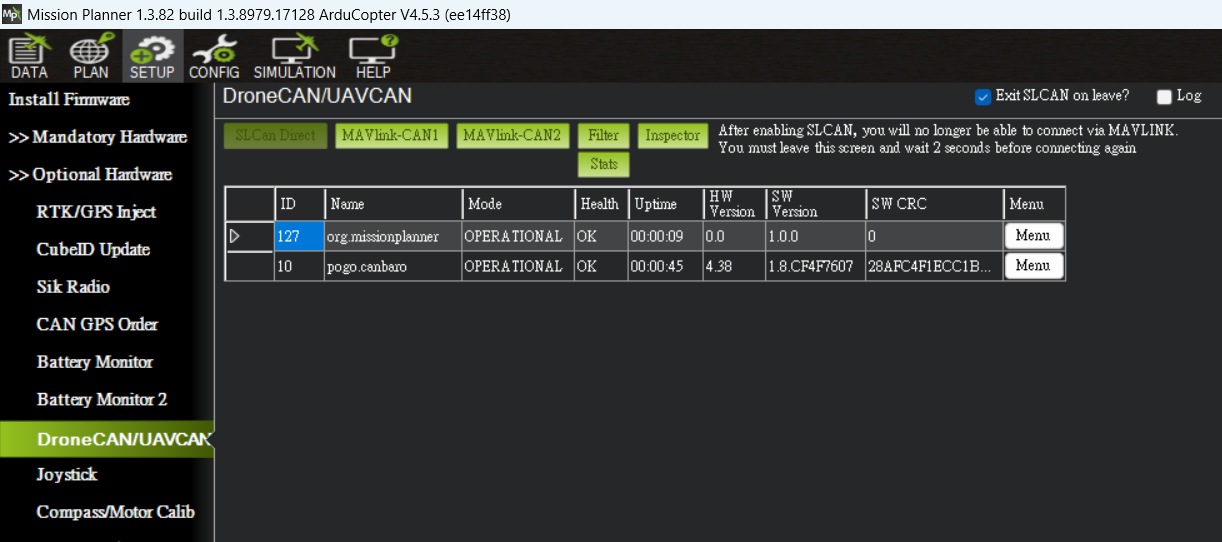
A connected module (e.g., pogo.canbaro for a barometer) should appear with Mode = OPERATIONAL and Health = OK.
View Detailed Protocol Data
Click Inspector to see all DroneCAN messages from the module:
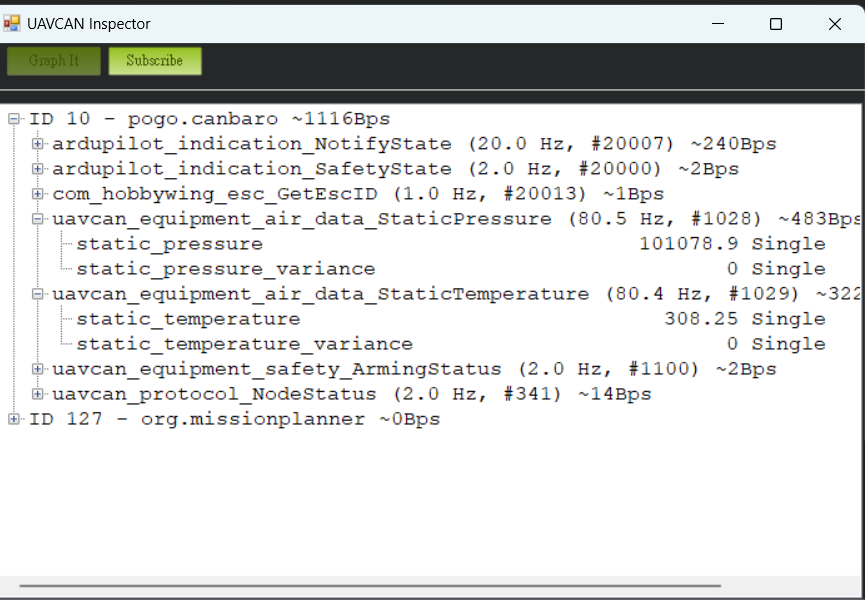
Sample output:
ID 10 - pogo.canbaro ~1116Bps
  ardupilot_indication_NotifyState (20.0 Hz)
  ardupilot_indication_SafetyState (2.0 Hz)
  uavcan_equipment_air_data_StaticPressure (80.5 Hz)  ← live barometer
    static_pressure         101078.9 Pa
  uavcan_equipment_air_data_StaticTemperature (80.4 Hz)
    static_temperature      308.25 K
  uavcan_equipment_safety_ArmingStatus (2.0 Hz)
  uavcan_protocol_NodeStatus (2.0 Hz)
Confirm Data Reaches the Flight Controller
In Mission Planner Status page, you should see:
- press_abs2: secondary barometer absolute pressure (from DroneCAN module)
- press_temp2: secondary barometer temperature
Continuously updating values mean the CAN link works.
FAQ
Q: No nodes appear after clicking MAVlink-CAN1?
A: Check:
1. Wiring (CAN_H / CAN_L not swapped)
2. CAN bus termination (120 Ω, usually built into the module)
3. Both CAN_P1_DRIVER and CAN_D1_PROTOCOL are set
4. Flight controller has been rebooted
Q: Inspector shows messages but Status doesn't show press_abs2?
A: Verify your ArduPilot firmware version supports secondary baros via DroneCAN. You may need to set BARO2_DEVID to match the DroneCAN ID.