SparkNavi F9P GPS Module Setup
The SparkNavi F9P GPS module combines a u-blox ZED-F9P-04B multi-band RTK receiver with a BMM150 compass on a compact 36.5 × 36.5 mm board. It supports use as GPS1, GPS2, or both simultaneously on the SparkNavi Blue flight controller, and is compatible with Pixhawk / ArduPilot / iNAV firmware.
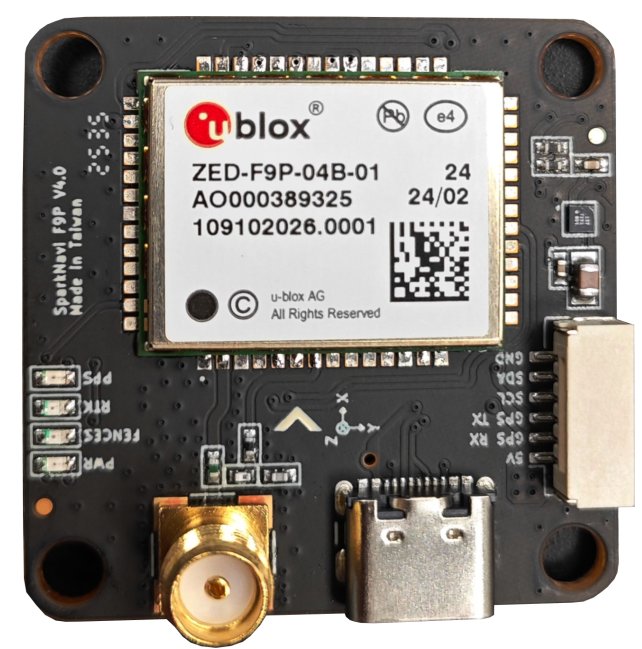
Hardware Specifications
| Category | Value |
|---|---|
| GNSS receiver | u-blox ZED-F9P-04B (multi-band L1 / L2 / E5b) |
| Constellations | GPS (L1C/A L2C), GLONASS (L1OF L2OF), Galileo (E1-B/C E5b), BeiDou (B1I B2I), QZSS (L1C/A L2C) |
| SBAS | WAAS, EGNOS, MSAS, GAGAN, SouthPAN |
| Accuracy (antenna-dependent) | <1 cm with base station up to 35 km · 1 cm with NTRIP up to 35 km · 4 cm with SSR · 1.5 m standalone · 0.9 m SBAS |
| Update rate | 1 Hz default · up to 10 Hz max performance · up to 20 Hz reduced |
| Time to first fix | 25 s cold / 2 s hot · RTK fix 35 s cold |
| Compass | Bosch BMM150 (I²C, 3-axis magnetometer) |
| Functionality | Base & Rover, RAW UBX output |
| Interfaces | UART × 1, USB Type-C × 1 |
| Operating temperature | −40 °C to +85 °C |
| Dimensions | 36.5 × 36.5 mm, screw spacing 30.5 × 30.5 mm, 10.0 g |
| Origin | Designed and manufactured in Taiwan |
Antenna selection determines real-world accuracy
The centimeter-level accuracy figures above assume a multi-band antenna covering L1 / L2 / E5b with stable phase center and good multipath rejection (typically a survey-grade helical or patch antenna). With a single-band patch antenna — even with RTK corrections available — real-world accuracy will fall back toward the standalone / SBAS figures. Antenna choice is the single largest factor in achievable precision for this module.
Hardware Wiring
The SparkNavi F9P module uses a 6-pin connector:
| Pin | Signal | Description |
|---|---|---|
| 1 | +5V | Module power |
| 2 | GPS RX | UART receive (from FC TX) |
| 3 | GPS TX | UART transmit (to FC RX) |
| 4 | SCL | I²C clock (BMM150 compass) |
| 5 | SDA | I²C data (BMM150 compass) |
| 6 | GND | Ground |
Connecting to SparkNavi Blue GPS1
GPS1 on SparkNavi Blue is an 8-pin connector. The first 5 signal pins map 1-to-1 with the F9P module; pins 6–7 (SAFETY_SWITCH / LED) on Blue are not used by this module.
| Blue GPS1 Pin | Signal | SparkNavi F9P Pin |
|---|---|---|
| 1 | +5V | 1 (+5V) |
| 2 | GPS1_TX | 2 (GPS RX) |
| 3 | GPS1_RX | 3 (GPS TX) |
| 4 | I2C2_SCL | 4 (SCL) |
| 5 | I2C2_SDA | 5 (SDA) |
| 6 | SAFETY_SWITCH | — (not connected) |
| 7 | SAFETY_SWITCH_LED | — (not connected) |
| 8 | GND | 6 (GND) |
Connecting to SparkNavi Blue GPS2
GPS2 on SparkNavi Blue is a 6-pin connector — a direct 1-to-1 match with the F9P module.
| Blue GPS2 Pin | Signal | SparkNavi F9P Pin |
|---|---|---|
| 1 | +5V | 1 (+5V) |
| 2 | GPS2_TX | 2 (GPS RX) |
| 3 | GPS2_RX | 3 (GPS TX) |
| 4 | I2C2_SCL | 4 (SCL) |
| 5 | I2C2_SDA | 5 (SDA) |
| 6 | GND | 6 (GND) |
Note
Both GPS1 and GPS2 share the same I²C2 bus on SparkNavi Blue. When two SparkNavi F9P modules are connected simultaneously, both BMM150 compasses are detected on I²C2 with different addresses — ArduPilot automatically assigns them as the primary and secondary external compasses.
ArduPilot Parameters — Single GPS (Primary)
For a single SparkNavi F9P module connected as GPS1, the default ArduPilot serial settings (GPS UART at 230 400 baud) already work. The key parameters to verify:
| Parameter | Value | Description |
|---|---|---|
GPS1_TYPE |
2 (u-Blox) |
u-blox driver (auto-detects F9P) |
GPS_AUTO_CONFIG |
3 |
Clear non-ArduPilot config and apply defaults on boot (recommended for u-blox Gen 9+) |
GPS_AUTO_SWITCH |
1 (Use best) |
Default — switches based on fix quality |
GPS_PRIMARY |
0 (GPS1) |
First instance is primary |
After Write Params and Reboot, Mission Planner Status should show:
- gpsstatus ≥
3(3D fix);4= DGPS,5= RTK Float,6= RTK Fixed - satcount typically 20–30+ with clear sky view (multi-constellation)
ArduPilot Parameters — Dual GPS
When using two SparkNavi F9P modules (GPS1 + GPS2), both are identical multi-band F9P units. The recommended switching strategy is Blend.
| Parameter | Value | Description |
|---|---|---|
GPS1_TYPE |
2 (u-Blox) |
Primary instance |
GPS2_TYPE |
2 (u-Blox) |
Secondary instance |
GPS_AUTO_CONFIG |
3 |
Clean u-blox config on boot |
GPS_AUTO_SWITCH |
2 (Blend) |
Average the two solutions |
GPS_PRIMARY |
0 (GPS1) |
First instance is primary when not blending |
GPS_INJECT_TO |
127 (Broadcast) |
Forward RTCM correction stream to both GPSes — required for RTK with NTRIP |
Why Blend for two identical F9P modules?
GPS_AUTO_SWITCH = 2 (Blend) is designed for two units of the same type and quality. Both F9P modules will normally produce equally-good solutions, and blending suppresses transient errors on either unit. If the two modules are dissimilar (e.g., one F9P + one M8N), use 4 (Use Primary if 3D fix) instead.
GPS Auto Configuration (GPS_AUTO_CONFIG)
GPS_AUTO_CONFIG controls whether ArduPilot rewrites the GPS module's internal configuration on boot:
| Value | Behavior | When to use |
|---|---|---|
0 |
Disable automatic configuration | Only when using a custom GPS configuration written by hand via u-center — not recommended for the SparkNavi F9P |
1 |
Auto-configure serial GPS modules | Default. Works for most use cases |
2 |
Auto-configure DroneCAN GPS modules as well | Required when configuring GPS for Yaw / Moving Baseline over DroneCAN |
3 |
Clear all non-ArduPilot u-blox config and reapply defaults | Recommended for SparkNavi F9P — guarantees a clean known-good config every boot (u-blox Generation 9+) |
Reverting from Moving Baseline mode
If GPS_AUTO_CONFIG = 2 is selected for a Moving Baseline setup and you later want to return to non-moving-baseline operation, connect to the DroneCAN peripheral(s) and manually restore the internal GPSx_TYPE parameters to default. See ArduPilot's Positioning Landing Page for details.
GPS Auto Switch (GPS_AUTO_SWITCH)
When two GPS units are connected, GPS_AUTO_SWITCH decides which solution ArduPilot uses:
| Value | Behavior | Best for |
|---|---|---|
0 Use Primary |
Always use the GPS at index GPS_PRIMARY |
When the secondary unit is only a passive backup |
1 Use Best |
Pick the unit with the better fix status (RTK > DGPS > 3D); ties broken by satellite count | General default for two reasonable-quality GPSes |
2 Blend |
Average the two solutions | Two identical SparkNavi F9P modules — recommended |
4 Use Primary if 3D fix |
Stay on the primary as long as it has a 3D fix; fall back to secondary only on loss | Mixed setup (e.g., one F9P primary + one M8N backup) |
EKF3 also supports GPS affinity with lane switching: an EKF lane can be bound to a specific GPS instance, and the whole lane is switched out if that GPS becomes unhealthy. When GPS_PRIMARY is used for a lane and GPS_AUTO_SWITCH is enabled, the lane will follow the auto-switch decision.
GPS Jamming Mediation (EK3_OPTIONS bit 0)
For operations in contested or RF-noisy environments (a common requirement for defense and industrial UAV platforms), ArduPilot provides EKF3 jamming mediation:
Setting EK3_OPTIONS bit 0 (JammingExpected) changes EKF3 behavior such that, when GPS lock is lost for more than 2 seconds and dead-reckoning navigation is possible, the preflight alignment GPS quality checks (EK3_GPS_CHECK, EK3_CHECK_SCALE) must pass again before GPS is re-used.
This prevents corrupted GPS data from being immediately consumed by the EKF after re-lock — a likely failure mode under deliberate jamming or spoofing.
What 'dead reckoning' means here
The dead reckoning referenced above is EKF3's short-term position extrapolation using internal sensors (IMU, magnetometer, barometer) during brief GPS dropouts. Its useful duration is on the order of seconds, not minutes. This is fundamentally different — in principle and in accuracy class — from tactical-grade inertial navigation built on fiber-optic or ring-laser gyros (FOG / RLG), which can operate independently for much longer periods. The two should not be conflated.
Accordingly, this option protects solution quality across short jamming events followed by GPS recovery — it is not a substitute for sustained GPS-denied flight capability. Extended GPS-denied operation requires additional sensor sources such as optical flow + laser rangefinder, visual-inertial odometry (VIO), SLAM, or external position injection; see ArduPilot's GPS / Non-GPS Transitions documentation for further reading.
Operational context
The default ArduPilot behavior assumes a benign RF environment and consumes GPS as soon as it relocks. For platforms operating in environments where jamming is plausible — defense, near contested airspace, or near high-power RF emitters — enabling this option provides an important safety margin. Always combine with appropriate failsafe configuration (RTL / loiter on GPS loss) tested in your operational profile.
BMM150 Compass
The onboard BMM150 is detected automatically by ArduPilot over the I²C2 bus.
After connecting and rebooting, in Mission Planner Setup → Mandatory Hardware → Compass:
- Verify detection — the BMM150 should appear as an external compass (typically priority 1 if no other external compass is connected)
- Disable internal compasses — for best yaw performance, deselect the FC's internal compasses if external compasses are healthy (SparkNavi Blue has no internal compass, so this step is automatic)
- Set orientation — set
COMPASS_ORIENTto match the physical mounting of the GPS module (the arrow on the PCB silkscreen should point toward the front of the aircraft; if rotated, setCOMPASS_ORIENTaccordingly) - Calibrate — perform the on-board or Mag Cal procedure, rotating the airframe through all axes
Compass priority with dual GPS
When two SparkNavi F9P modules are connected, both BMM150 compasses appear on the same I²C2 bus. Set COMPASS_PRIO1_ID / COMPASS_PRIO2_ID (by compass device ID, visible in the Compass setup screen) so that the compass on the GPS module farther from electrical noise sources (ESCs, power wires) is the priority 1 compass.
Verification
After full setup, the Mission Planner HUD should show:
- 3D Fix or better within 30 seconds outdoors
- Sat count typically 20–30+ with clear sky
- HDOP below 1.0 within 1 minute
- RTK Fixed within ~35 seconds when a base station / NTRIP correction is active
For RTK operation, set GPS_INJECT_TO = 127 and stream RTCM3 corrections from Mission Planner (Initial Setup → Optional Hardware → RTK GPS Inject) or a custom NTRIP client.