MTF-01 Optical Flow Setup
MicoAir MTF-01 integrates optical flow + laser rangefinder in one module, enabling position hold in GPS-denied environments (indoor, under bridges, beneath canopy). This guide covers integration with SparkNavi Blue.
Hardware Wiring
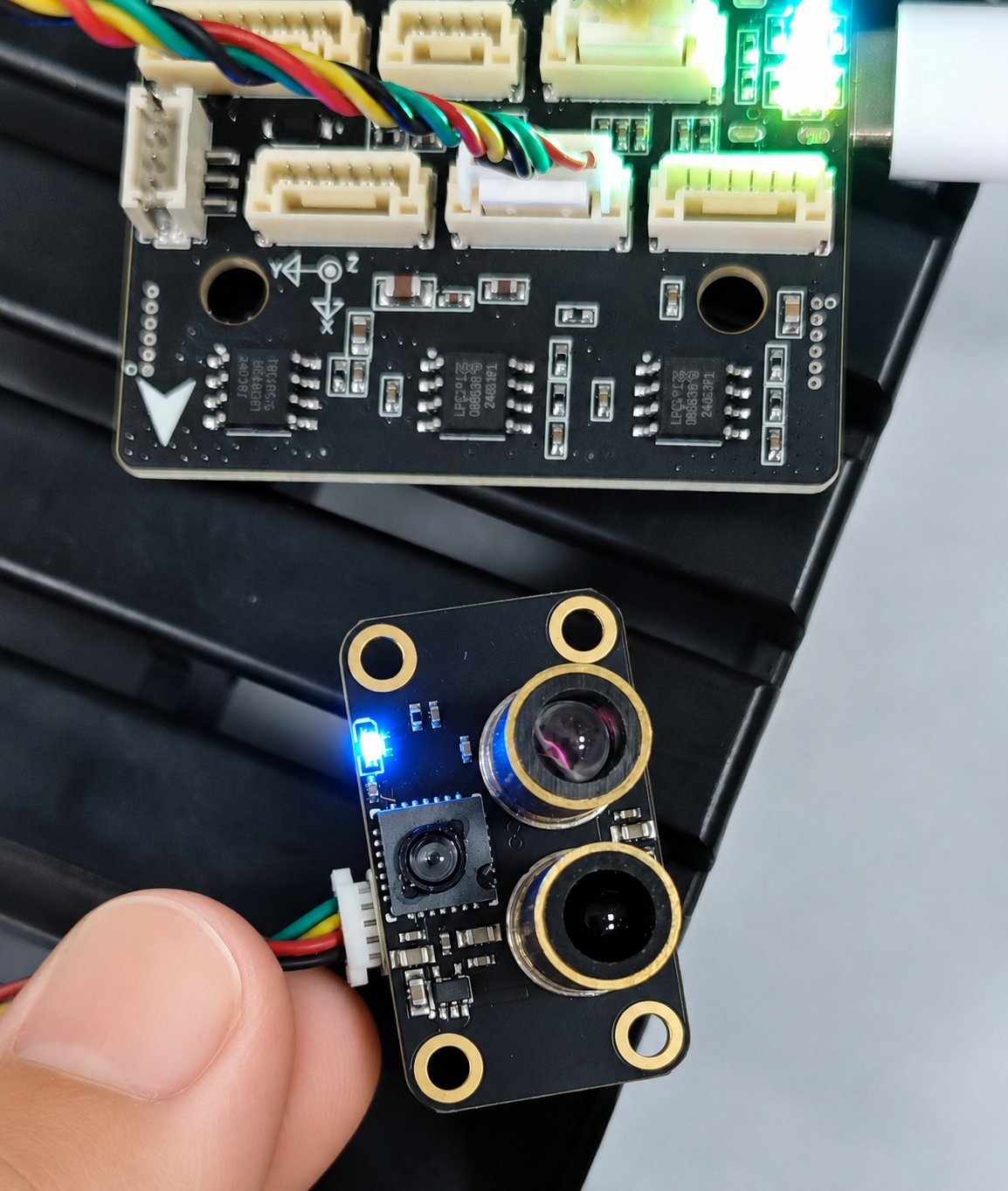
Connect MTF-01 to the SparkNavi Blue TELEM2 port (UART communication).
TELEM2 pinout:
| Pin | Signal | Description |
|---|---|---|
| 1 | +5V | Peripheral power |
| 2 | TX | UART send (to MTF-01 RX) |
| 3 | RX | UART receive (from MTF-01 TX) |
| 4 | CTS | Flow control (unused here) |
| 5 | RTS | Flow control (unused here) |
| 6 | GND | Ground |
micoAssistant Pre-Setup
⚠️ Important: when using ArduPilot 4.5.0 or newer, ArduPilot may not recognize the MTF-01 with default MAV_ID.
Use micoAssistant to connect to MTF-01 first and adjust:
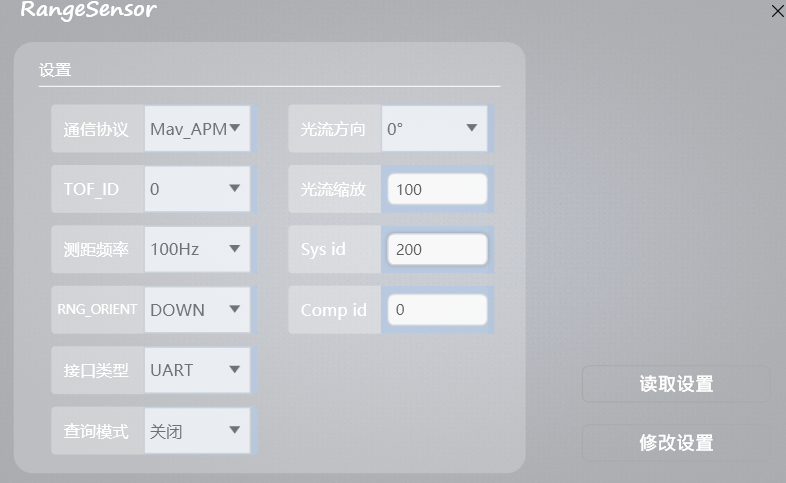
1. Set Communication Protocol
In the RangeSensor settings dialog, set Protocol to Mav_APM (or PX4 if you use PX4 firmware).
2. Modify MAV_ID
Change MAV_ID (shown as Sys id) to 200 (any value other than the default 1; 200 is common).
3. Other Settings
| Field | Value | Description |
|---|---|---|
| Protocol | Mav_APM |
ArduPilot firmware |
| Optical flow direction | 0° |
Mounting rotation |
| TOF_ID | 0 |
Rangefinder ID |
| Measurement frequency | 100Hz |
Laser update rate |
| RNG_ORIENT | DOWN |
Pointing down |
| Interface type | UART |
Serial mode |
| Optical flow scaler | 100 |
Flow gain — adjust by airframe size |
| Sys id | 200 |
MAV_ID (non-default) |
Click Modify Settings to write to MTF-01.
ArduPilot SERIAL2 Configuration
In Mission Planner Config → Full Parameter List:
| Parameter | Value | Description |
|---|---|---|
SERIAL2_PROTOCOL |
1 (MAVLink1) |
TELEM2 protocol |
SERIAL2_BAUD |
115 (115200) |
TELEM2 baud rate |
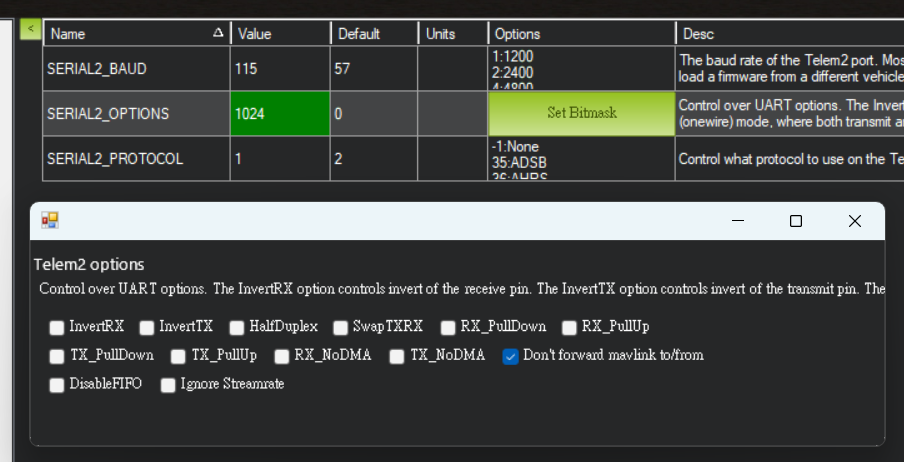
SERIAL2_OPTIONS |
0 |
Keep default 0 on ArduPilot 4.6.3+; older versions may need 1024 (Don't forward MAVLink to/from) |
⚠️ Version notes:
- ArduPilot 4.6.3 and newer: SERIAL2_OPTIONS stays at 0
- ArduPilot 4.5.x – 4.6.2: SERIAL2_OPTIONS may need 1024 (check "Don't forward mavlink to/from")
Distance Sensor (RNGFND1) Setup
After rebooting, these parameters become available:
| Parameter | Value | Description |
|---|---|---|
RNGFND1_TYPE |
10 (MAVLink) |
Rangefinder type |
RNGFND1_ORIENT |
25 (Downward) |
Mounting orientation |
RNGFND1_MIN_CM |
5 |
Minimum effective range (cm) |
RNGFND1_MAX_CM |
1200 |
Maximum effective range (cm) |
RNGFND1_ORIENT = 25 corresponds to "Downward" per the official parameter docs.
Optical Flow (OPTFLOW) Setup
| Parameter | Value | Description |
|---|---|---|
FLOW_TYPE |
5 (PX4Flow) |
Optical flow type (MAVLink) |
FLOW_FXSCALER |
0 |
X-axis gain (start at 0, tune in flight) |
FLOW_FYSCALER |
0 |
Y-axis gain |
FLOW_ORIENT_YAW |
0 |
Mounting yaw rotation (degrees) |
Verification
After setup and reboot, in Mission Planner Status page:
- sonarrange: live rangefinder reading (changes with altitude)
- flow_x / flow_y: optical flow velocity
On the ground, moving the flight controller laterally should change flow_x / flow_y; raising or lowering the FC should change sonarrange.