GUI, Recording & Calibration
For IMU600-V2 / firmware 0.11.2 / GUI v1.6.1.
GUI download by request: contact ethan@robotlab.com.tw. Extract the complete package and run SparkNavi_IMU600.exe.
Connect & Auto Detect
- Wire UART1 and power as in the wiring guide. Select the COM port and factory baud 460800, then connect.
- The GUI reads CFG and INFO. Check firmware, serial number, output rate and IMU1 / 2 / 3, fused, AHRS and barometer cards.
- For an unknown baud, use Auto Detect, which sends PING at the four UART1 rates. If needed, click Boot Rescue and power-cycle within 20 seconds; the GUI sends commands during the roughly 0.5-second startup rescue window.
Dashboard
The dashboard contains attitude HUD, 3D model, individual IMUs, fused data, AHRS, barometer and system/device information. The HUD shows temperature on the left and relative barometric altitude on the right; the red model axis is +X. PPS status bit7 (128) is a timing marker, not a sensor fault.
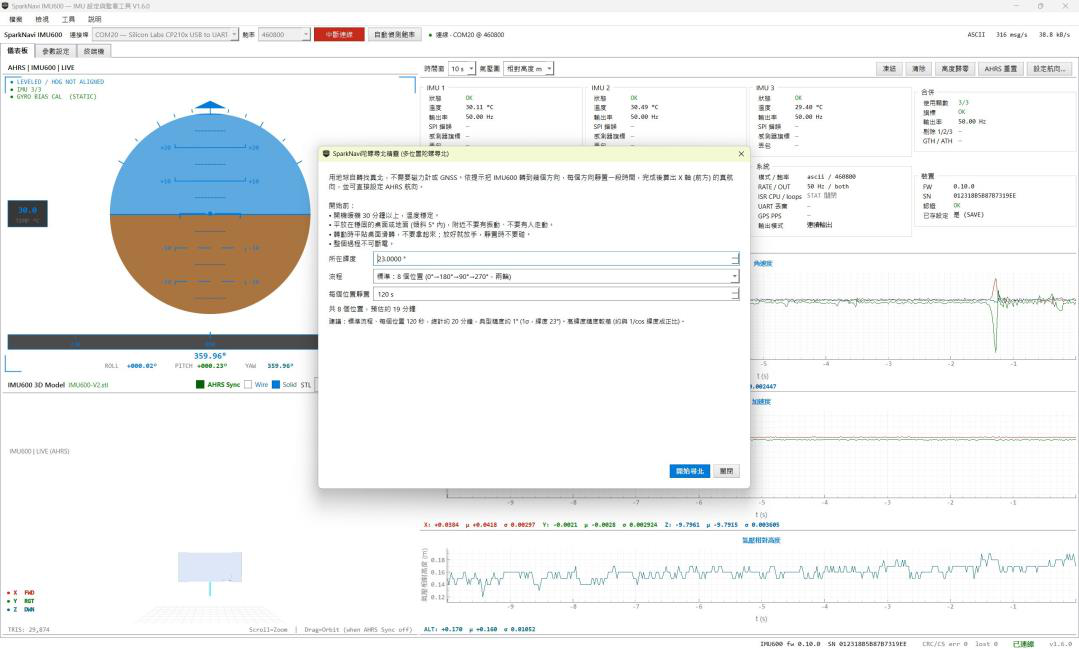
- Keep still for about one second after AHRS Reset. Yaw is relative and can drift; HDG sets a manual heading, not a continuous absolute-heading source.
- Use STAT = 1 for periodic system statistics. Recording writes received bytes unchanged to
.bin; parse according to the active output mode, since the extension alone does not imply binary framing.
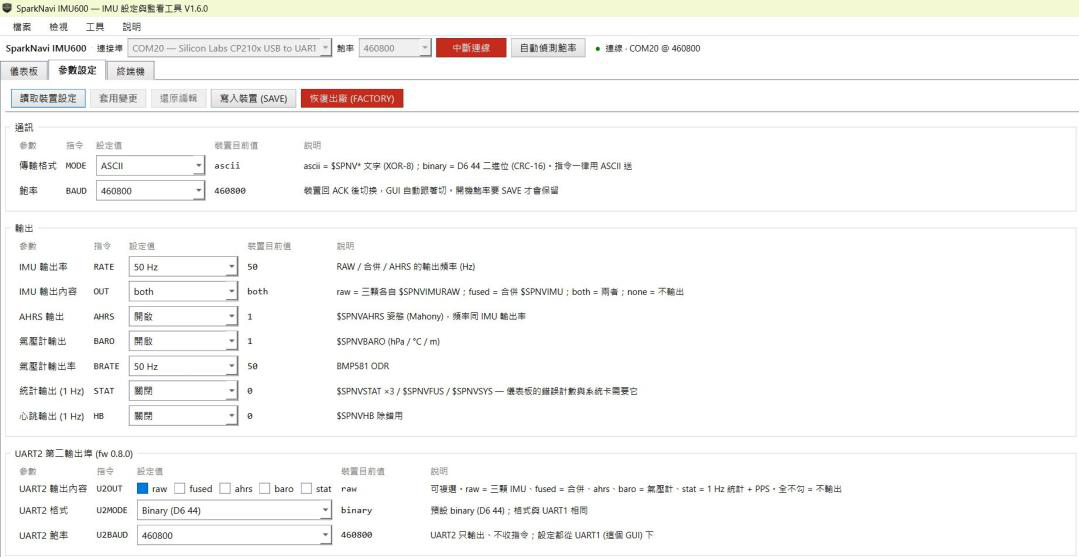
Parameters: Apply & Save
| Action | Effect |
|---|---|
| Apply | Sends changed settings to RAM only; not retained across power loss. |
| SAVE | Stores settings in flash. IMU operation briefly pauses during writing; do this while the system is idle. |
| FACTORY | Restores settings without erasing calibration; switches to 460800 ASCII after ACK. |
| CALSAVE / CALCLR | Separate calibration / weight storage and clearing, distinct from normal SAVE. |
Groups cover output rate/content, format/baud, GTH/ATH, AHRS gains, UART2, PPS/trigger and SPI3. BAUD is acknowledged at the old baud before the host switches. A bandwidth estimate of ≥90% turns red; reduce rate/content, select binary or increase baud.
Six-Face Calibration & Fusion Weights
- Run GUI six-face accelerometer calibration. Place each requested face upward and keep still for about four seconds, following all six prompts.
- The GUI computes and writes each IMU’s offsets and scale factors. ACAL uses a = (a_raw − b) × k, with |b| ≤ 2 m/s² and 0.95 ≤ k ≤ 1.05.
- FWGT g / a selects gyro / accelerometer weights. Each of the three relative weights must satisfy 0 < w ≤ 100; defaults are all 1. Store with CALSAVE and verify with CAL.
Follow the GUI prompts for the north-finding wizard under Tools. Chinese / English UI and light / dark themes are available; restart after changing UI language.
Terminal
Enter RATE,100 or rate 100; the GUI adds $SPNVCMD and checksum. Input starting with $ is sent verbatim. Use ↑ / ↓ for history; INFO, CFG, DBG, PING, STAT now and BOOT shortcuts are available. See ASCII and commands.
Calibration Math, Allan Weighting & Lever Arm
Six-face calibration places +X / −X / +Y / −Y / +Z / −Z upward in turn. Per sensor and axis, b = (a_up + a_down)/2 and k = 2g/(a_up − a_down), using positive / negative gravity readings. The GUI wizard sends three ACAL commands and CALSAVE on completion.
a_corrected  = (a_raw - b) * k
dv_corrected = (dv_raw - b * dt) * k
This calibration affects RAW and FUSED, correcting accelerometer bias and scale, not cross-axis orthogonality. AHRS gyro bias estimation is separate. CALCLR clears RAM and NVM calibration, restoring zero bias, unit scale and equal weights.
- For Allan analysis, avoid keyboard / fan vibration and record at least 30 minutes stationary, longer as required.
- Use RATE,100 and OUT,both so all three RAW streams are retained. Prefer binary and check baud / drops; 100 Hz ASCII both exceeds 460800 bandwidth.
- The vendor tool uses the longest continuous segment, evaluates ARW / VRW at τ=1 s and bias instability, then normalizes w = 1/σ² to suggest FWGT. Review before applying and CALSAVE.
The three IMU positions relative to the reference point are factory-fixed and cannot be changed by commands. SPNVCAL lever=1 indicates active lever-arm compensation.
Communication details also follow Protocol v1.1, pages 18–20. See the protocol overview.
GUI Versions and Display Controls
| Feature | Minimum Firmware |
|---|---|
| GUI | 0.4.2 |
| UART2 / PPS | 0.8.0 |
| 200 / 400 / 500 Hz | 0.10.3 |
| SPI3 | 0.10.0 |
The manual’s factory firmware 0.11.2 supports these features. The connection bar shows COM, baud, firmware, serial number and receive rate; ● REC flashes while recording. Auto Detect sends PING at 460800, 921600, 1500000 and 2000000 in order.
| Location / Control | Function |
|---|---|
| Dashboard / 3D | Rotate/flip using the model title bar to align forward with red +X. HUD left: IMU temperature; right: relative barometric altitude. |
| View 1: IMUx | IMU1/2/3, fused, AHRS, barometer, system and device cards; colors reflect error bits, excluding PPS. |
| View 2: System Information | UART drops (UART2 in parentheses), CPU, output rate, PPS state and oscillator ppm; requires STAT enabled. |
| Gyro / Acceleration Plots | Select IMU1/2/3/fused and X/Y/Z. Readouts show latest value, mean μ and standard deviation σ; use stationary σ to inspect noise. |
| Barometer Plot / Zero Altitude | Switch relative altitude, hPa or temperature. Zero Altitude changes only the GUI display, not device measurements or protocol data. |
| Parameter Table | Left: current CFG values. Right: editable values, with orange ● on changes. Apply sends changed items only; GUI switches host baud after BAUD ACK. |
| Terminal Display | ASCII and binary are decoded to text with category filters; high-rate lines are hidden until “Data lines” is checked. |
Source document:IMU600-V2 User Manual v1.1 · PDF pages 13–17