Reset, Firmware Update & Troubleshooting
For IMU600-V2 / firmware 0.11.2 / GUI v1.6.1.
MCLR External Reset
Pull J1 pin 17 low and release for hardware reset. An on-board 10 kΩ resistor pulls it to 3.3 V; the external circuit only pulls low. Do not drive it high with 5 V or a push-pull output. Leave open if unused.
| Method | Connection |
|---|---|
| A. Normally Open Button | MCLR → 470 Ω → switch → GND |
| B. N-MOSFET Open Drain | MCLR → 100–470 Ω → drain; source → GND. GPIO → 100 Ω → gate, with 100 kΩ gate pull-down; e.g. 2N7002. Host GPIO may be 3.3 / 5 V |
| C. 3.3 V Open-Drain GPIO | MCLR → 470 Ω → open-drain GPIO |
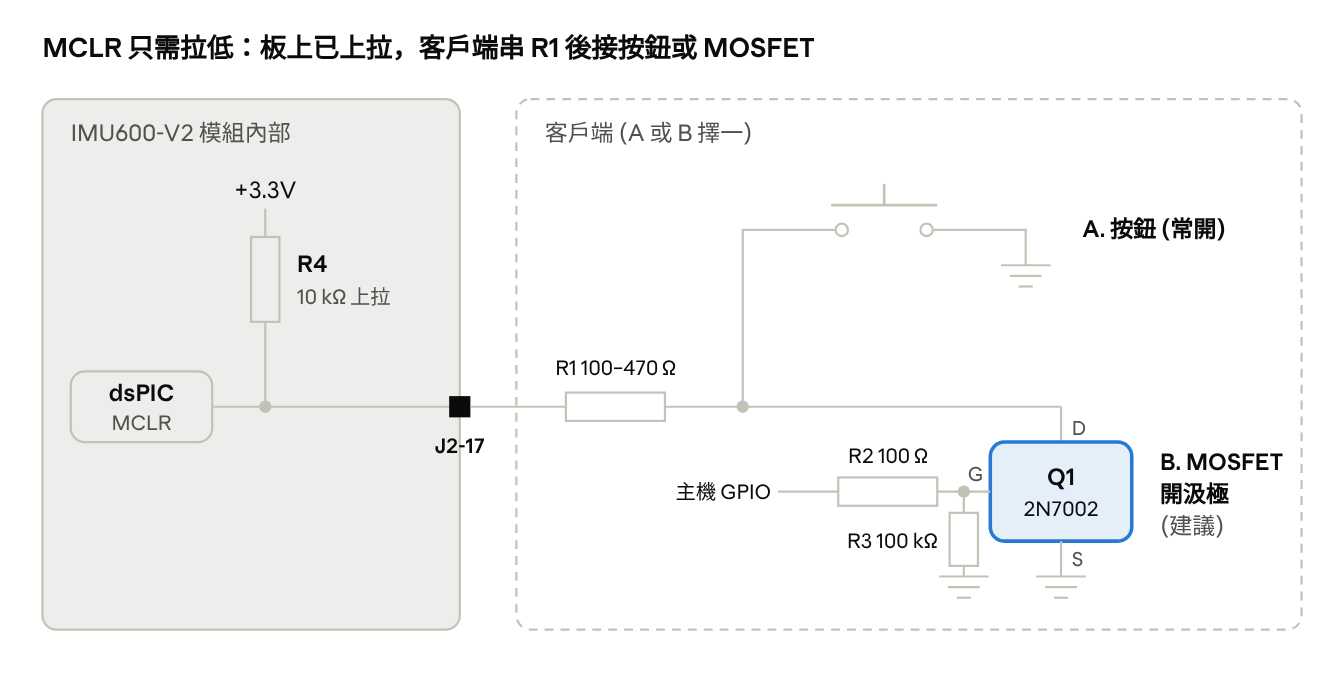
MCLR button / MOSFET reference circuit
- Hold low for at least 10 µs, preferably 1–10 ms. Holding low keeps the module in reset. In the MOSFET circuit, GPIO high = reset and low = normal operation.
- Retain the series resistor. For noisy wiring, add 1–10 nF to ground on the external side of that resistor, not a large capacitor directly on MCLR. Consider a 3.3 V TVS for exposed wiring or lengths over about 30 cm.
- After release, the bootloader waits about 120 ms, then IMU initialization takes about 250 ms. Saved settings load, ts_us resets and AHRS realigns; remain still for about one second. INFO / SPNVRESET should show EXTR(MCLR).
For a software reboot, use $SPNVCMD,BOOT,1; it also loads saved settings.
Normal Firmware Update
SparkNavi supplies encrypted, signed .spfw files for GUI / UART1 updates. Settings and six-face calibration are stored in separate flash and are retained according to the manual. Use the file matching the device hardware and batch.
- Connect in the GUI using the current baud and ASCII or binary mode.
- Open File → Firmware Update, select .spfw and check file version, target hardware, packaging time and current device version.
- Start the update. The module enters the bootloader, transfers at 460800 and reconnects after verification. Keep power and the connection stable throughout.
- Verify the new version in the status/device display, then read CFG / CAL and check settings and output.
Recovery Update
Use this for interrupted updates, a device remaining in the bootloader or no output. It differs from the 20-second Boot Rescue used for unknown configuration.
- Leave the GUI disconnected and select the COM port.
- Select File → Firmware Update → .spfw → Rescue Update.
- Power-cycle or reset with MCLR within 30 seconds so the GUI can catch the boot window.
| Update Error | Action |
|---|---|
| Key / Hardware Mismatch | Obtain the correct .spfw from SparkNavi |
| Verification Failed | Download a fresh original file and retry recovery |
| PICkit-Only Firmware | Development firmware; contact SparkNavi |
Troubleshooting
| Symptom | Check / Action |
|---|---|
| No Connection / Data | Check +5 V, crossed TX / RX, common ground and COM; use GUI baud detection |
| Garbled Text | Check baud; use GUI for binary or MODE,ascii for a text terminal |
| Settings Revert on Reboot | Apply changes RAM only; use SAVE,1 |
| Unknown Saved Settings | GUI Parameters → Boot Rescue; power-cycle within 20 s |
| uart_drop / u2_drop ↑ | Reduce RATE / content, use binary or raise the relevant baud; see bandwidth table |
| status 16 / SATURATED | Range saturation; inspect motion, impacts and vibration |
| status 32 / 44 | Normal briefly at startup; recurring in operation suggests power checks |
| status 8 / 12 | Try REINIT,1; contact SparkNavi if persistent |
| status 128 | PPS marker; assess quality with status & 0x7F |
| Yaw Drift | No absolute-heading source; use manual HDG or host fusion with external heading |
| AHRS flags bit4 | Movement during alignment; keep still then AHRS,reset |
| PPS NO_SIGNAL | Check pin 13, 3.3 V, rising edge, ground and 1 Hz reference |
| PPS ACQUIRING | Measure 999–1001 ms intervals; check GPS PPS and noise; STAT,1 enables reports |
| Unresponsive | Check whether MCLR is held low; use recovery after interrupted update |
| SPNVHALT | Contact SparkNavi with INFO output |
| No Triggered Output | First edge only sets baseline; check pin 15 / trig_cnt, or restore TRIG,0 |
| trig_rej ↑ | Glitches <0.5 ms; shorten wiring, share ground, use push-pull 3.3 V |
| PreArm: Gyro n rate … | This Blue2 integration requires RATE,1000 and SAVE,1 |
| IMU600 Not Found | Check custom firmware, SPI,ardupilot, SPICK,3, pins 6 / 8 / 10 / 12 and increasing txn |
| IMU600: SPI is in stream mode | Use SPI,ardupilot and SAVE |
| GUI Rate Incorrect at High Output | Check UART bandwidth; assess SPI separately. Disable OUT / AHRS / U2OUT for controller use |
Contact SparkNavi
Include complete INFO,1 and CFG,1 replies, firmware / GUI versions, wiring and operating conditions, and the raw .bin recorded by the GUI when contacting ethan@robotlab.com.tw.
Update Communication & Bootloader Window
According to the protocol, BOOT,1 acknowledges then restarts into the bootloader at 460800 bps, 8N1, waiting about 1.5 s for the updater HELLO without ordinary text output. Without an update request it returns to the application. This differs from normal MCLR startup and the 500 ms FACTORY rescue window for nondefault communication settings.
After an interrupted update or invalid application, the bootloader can remain in recovery. The firmware-update wire format is not published in this protocol; contact SparkNavi for custom updater integration.
Communication details also follow Protocol v1.1, pages 19–26. See the protocol overview.
Source document:IMU600-V2 User Manual v1.1 · PDF pages 35–40